Unlock advanced movement in Roblox with Shift Lock. This comprehensive guide covers everything you need to know about enabling and utilizing this powerful feature. Learn why mastering Shift Lock is essential for competitive play, improving your precision, and gaining an edge in various Roblox experiences. From understanding Roblox PC controls to navigating camera modes, we delve into how this setting enhances gameplay. Discover the simple steps to activate it in your settings menu and how it transforms your character's agility. Whether you're a new player looking to improve or an experienced gamer seeking better movement techniques, this article provides invaluable tips and tricks. Elevate your Roblox experience and achieve smoother, more responsive control today. Embrace the benefits of enhanced maneuverability and dominate your favorite games.
Hey there, fellow Roblox adventurer! Ever feel like you're missing out on some pro-level moves? You've landed in the right spot! This is your ultimate living FAQ, meticulously updated for the latest Roblox patches and gameplay nuances, designed to demystify 'how to Shift Lock in Roblox.' We're talking about the secret sauce for smoother movement, better aim, and overall enhanced gameplay. Many players stumble upon this feature but don't quite grasp its power or how to wield it effectively. Don't worry, we're here to clear up every doubt, from basic activation to advanced strategies, ensuring you’re equipped to dominate your favorite Roblox experiences. Let’s dive deep and get you moving like a pro!
Most Asked Questions about How to Shift Lock in Roblox
Beginner Questions
Q: What is the main purpose of Shift Lock in Roblox and why should I use it?
A: The main purpose of Shift Lock is to give you more precise control over your character's movement and camera. It locks your camera directly behind your avatar, allowing your mouse to independently control where your character is facing and aiming. You should use it because it vastly improves your ability to make accurate jumps in obbies, hit targets in combat games, and navigate tight spaces with greater agility. It's an essential tool for competitive or high-skill gameplay, transforming your control from good to great.
Q: How do I turn on Shift Lock in my Roblox game settings?
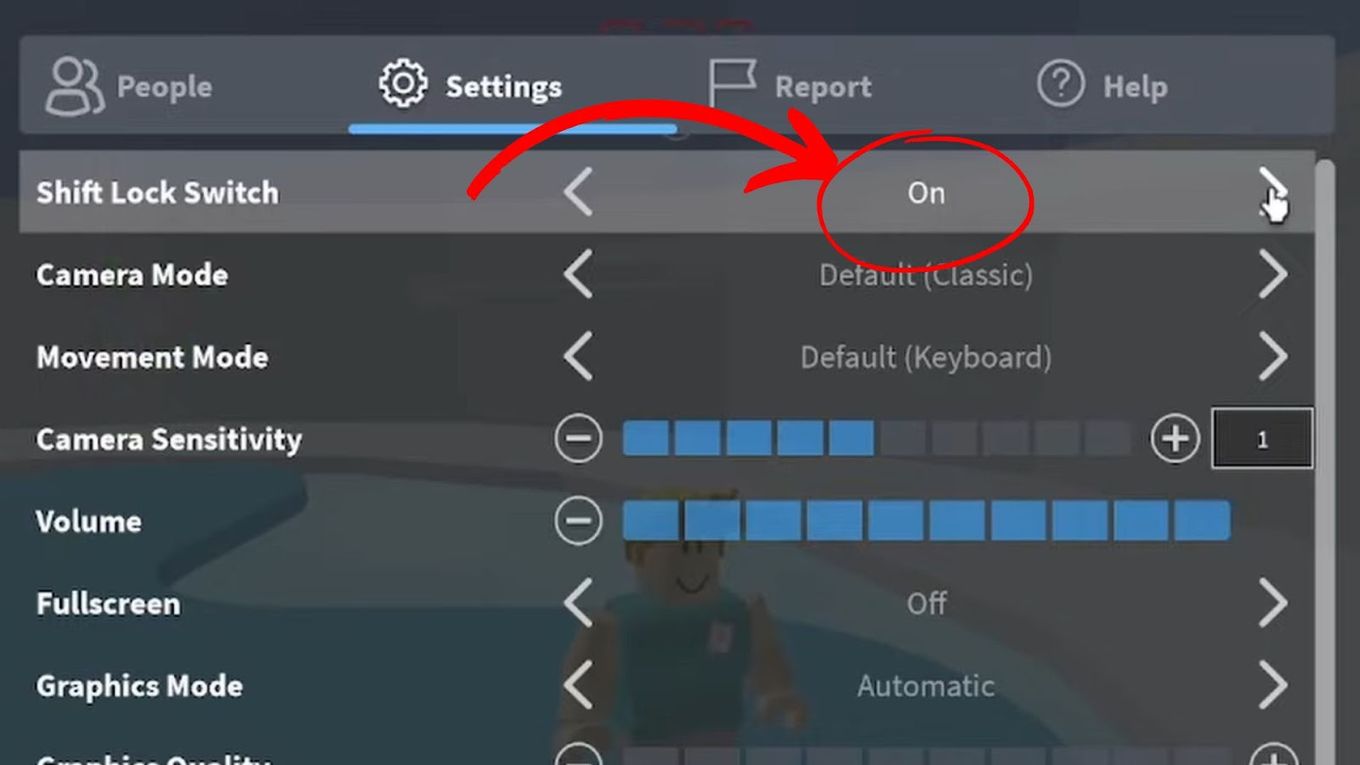
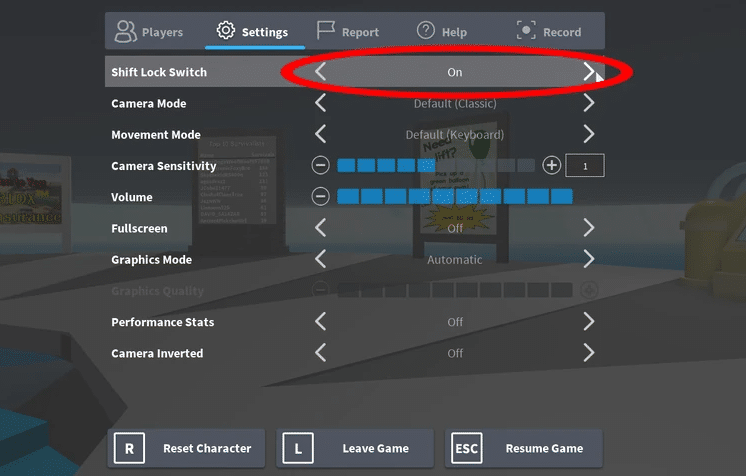
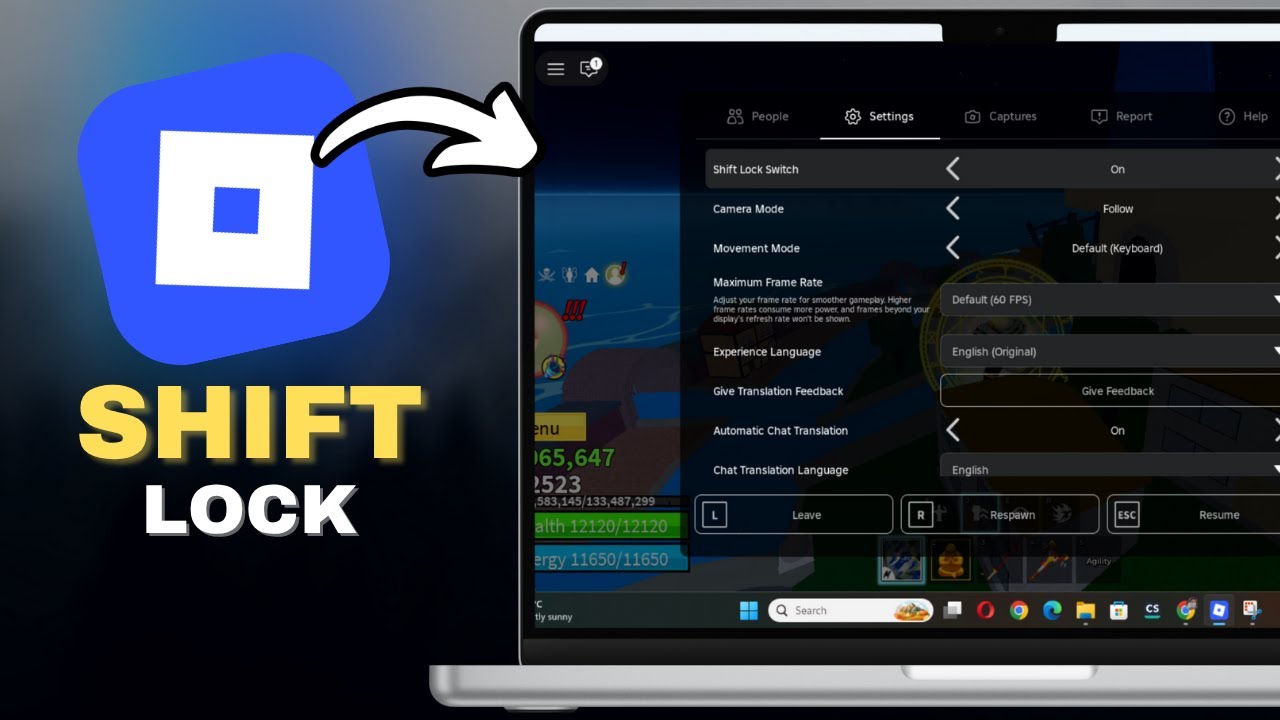
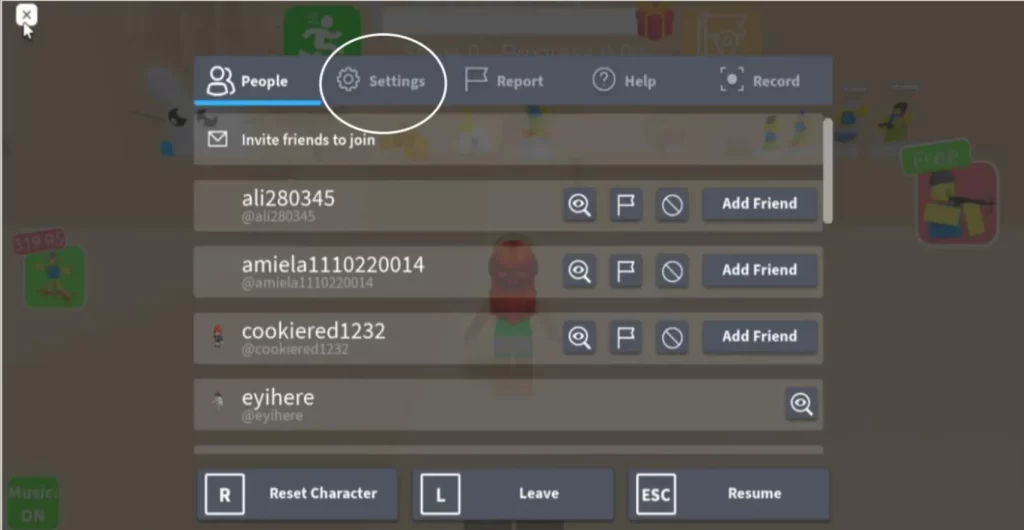
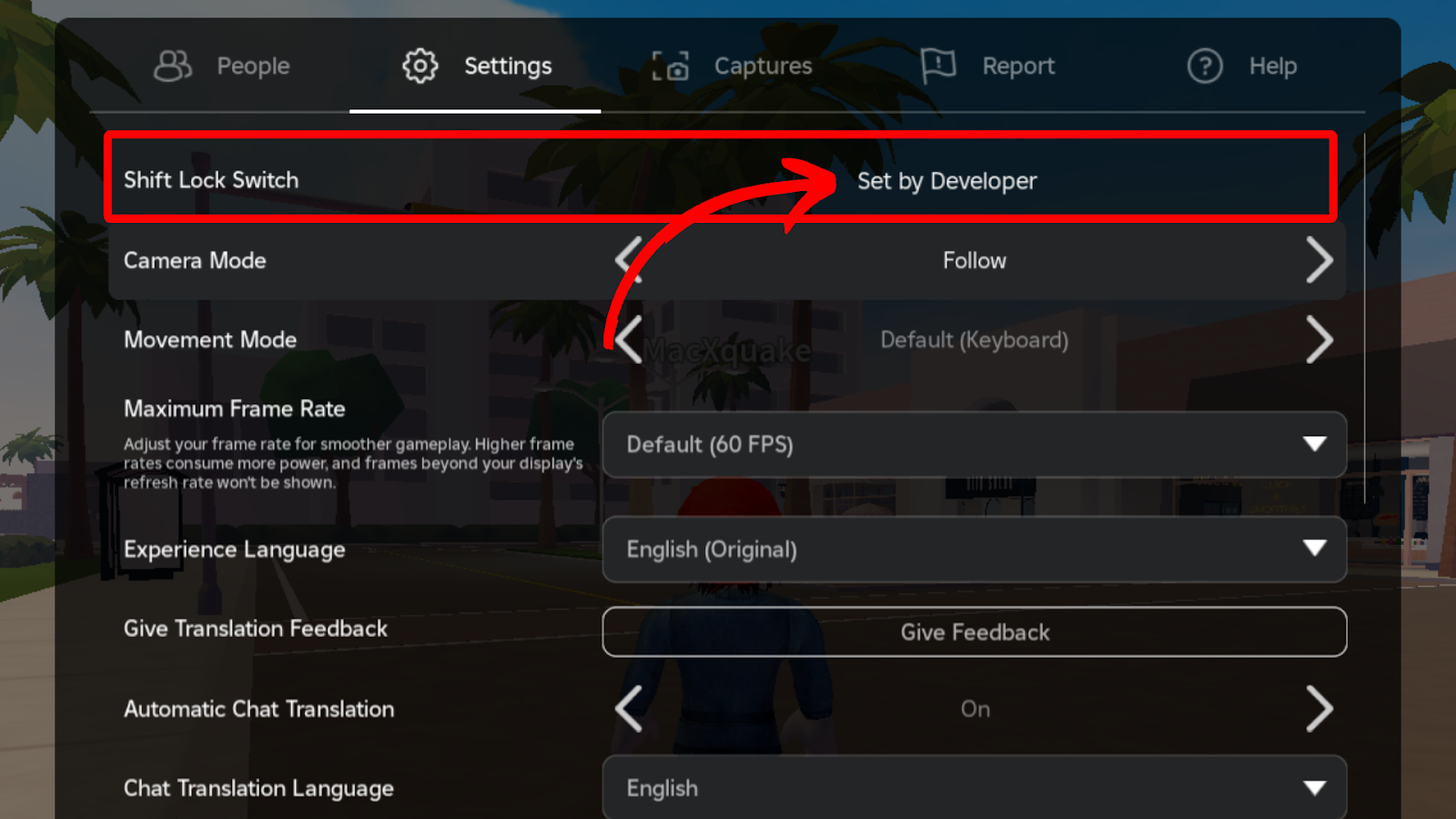
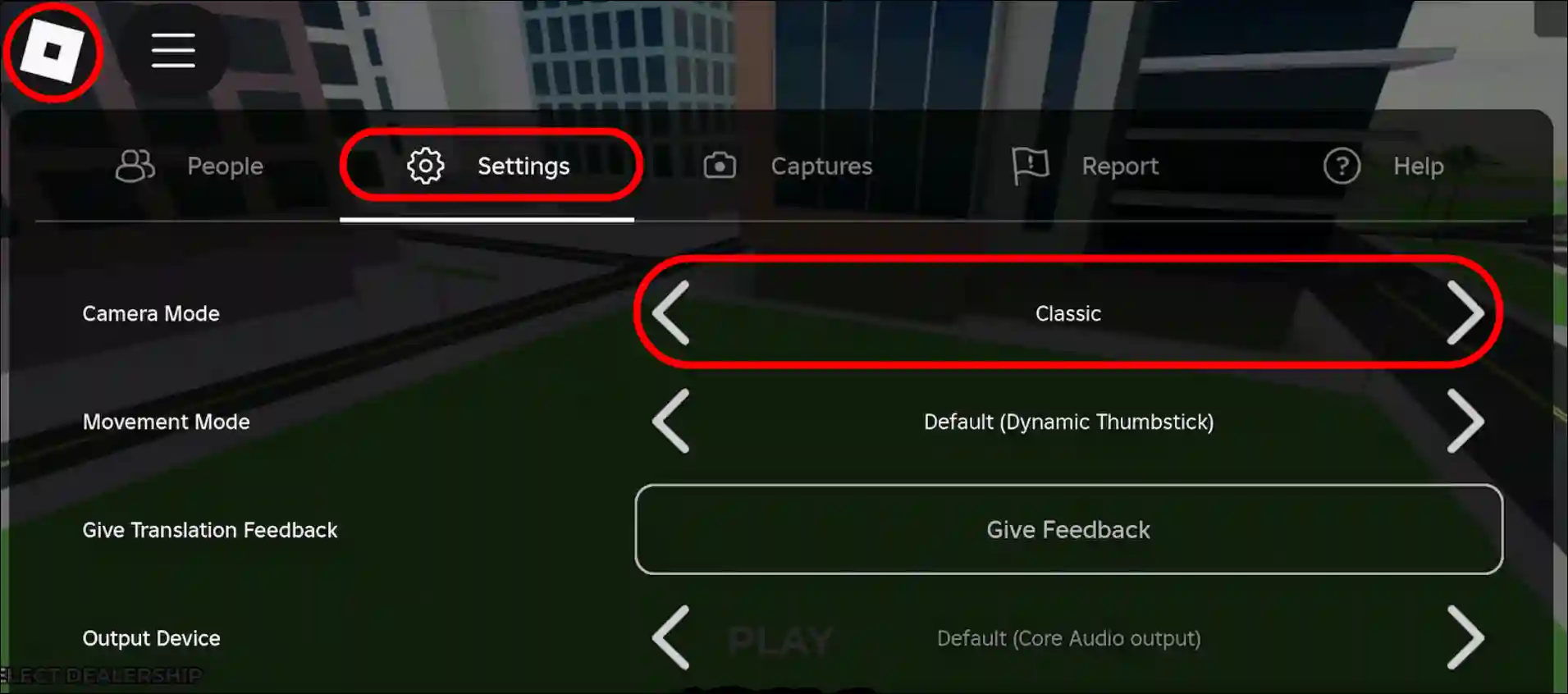
A: To turn on Shift Lock, simply launch Roblox and join any experience. Once in-game, press the 'Esc' key to open the Roblox menu. From there, click on 'Settings'. Within the settings panel, locate the 'Shift Lock Switch' option and toggle it to 'On'. After enabling it, you can activate Shift Lock at any time during gameplay by pressing and holding your Left Shift key. It’s a quick and easy setup that immediately enhances your control.
Q: Is Shift Lock available on all platforms, like mobile and Xbox, or just PC?
A: The classic Shift Lock functionality, activated by pressing the Shift key for a locked camera, is primarily designed for PC players. Mobile devices and Xbox consoles do not have a direct equivalent feature due to their different control schemes (touchscreen and gamepad, respectively). While mobile and console versions offer various camera settings and control customizations, they don't replicate the precise independent aiming and movement that Shift Lock provides on PC. So, for the full Shift Lock experience, PC is your platform.
Tips & Tricks
Q: What are some good tips for getting used to playing with Shift Lock enabled?
A: Getting used to Shift Lock takes a little practice, but it's totally worth it! Start by using it in less intense games or a private server to get a feel for the locked camera. Try simple movements like walking in circles, strafing, and making small jumps. Focus on moving your mouse to control your character's direction independently of your WASD keys. Gradually introduce it into more complex scenarios like obbies or combat. The key is to build muscle memory for the independent aiming, and soon it will feel completely natural, like an extension of your own movements. You've got this!
Q: How can I use Shift Lock to improve my aiming in Roblox FPS games?
A: To supercharge your aiming in Roblox FPS games with Shift Lock, focus on using your mouse *only* for aiming, while your WASD keys handle all movement. This separation is crucial. Practice 'tracking' targets by keeping your crosshair on them as you move around, strafing left and right, or circle-strafing. Shift Lock prevents your character's body from wildly turning with your aim, allowing for much smoother and more consistent targeting. It also enables quick flicks and precise headshots, giving you a significant edge in gunfights. Many pro players rely on this for their deadly accuracy.
Q: Are there specific scenarios where I should temporarily disable Shift Lock?
A: Absolutely! While Shift Lock is great for precision, there are times you'll want to temporarily disable it. If you need a wider field of view to quickly scan your surroundings, like checking for threats from the side or behind, toggling it off gives you that freedom. Also, for very casual exploration, interacting with certain large objects, or specific puzzle mechanics that require a broader perspective, the default free-floating camera might be more comfortable. It's all about being adaptable; use Shift Lock when precision is key, and disable it when situational awareness or comfort is more important. The power is in your hands to switch!
Bugs & Fixes
Q: My Shift Lock isn't working even after I enabled it. What troubleshooting steps can I take?
A: If your Shift Lock isn't cooperating, don't sweat it, we can troubleshoot! First, ensure you're pressing the *left* Shift key, not the right. Also, confirm that the 'Shift Lock Switch' in your Roblox settings is indeed set to 'On' and that you're attempting to activate it *within an actual game*, not just the main menu. Sometimes, a simple restart of the entire Roblox application can resolve minor glitches. You might also check if your physical Shift key on your keyboard is working correctly in other applications. If issues persist, ensure your graphics drivers are up to date. You’ll get it fixed!
Q: Could game-specific scripts or settings interfere with Shift Lock functionality?
A: Yes, it's possible for game-specific scripts or developer-imposed settings to interfere with or alter the default Shift Lock functionality. Some game developers implement their own custom camera systems or movement overrides that might conflict with or simply replace the standard Roblox Shift Lock. For example, a game might force a first-person perspective or have a unique third-person aiming mode. If Shift Lock isn't working as expected in a particular game, check that game's specific settings menu or look for developer notes, as they might have designed an alternative or disabled the default feature for their experience. It's often by design, not a bug.
Endgame Grind
Q: How does mastering Shift Lock contribute to excelling in high-level Roblox competitive play?
A: Mastering Shift Lock is absolutely crucial for excelling in high-level competitive Roblox play because it unlocks a superior level of control and efficiency. At the top tiers, every millisecond and pixel of aim matters. Shift Lock allows for advanced maneuvers like precise strafing while maintaining aim, quick evasive dodges, and consistent target tracking that un-locked camera players simply can't replicate with the same consistency. It contributes to faster reaction times, cleaner execution of complex movement patterns, and ultimately, a much higher kill-to-death ratio or faster completion times in skill-based games. It's a foundational skill for any serious competitor.
Multiplayer Issues
Q: Does using Shift Lock give me an unfair advantage over other players in multiplayer games?
A: Using Shift Lock doesn't give you an unfair advantage in the sense of cheating; it's a built-in feature accessible to all PC players! What it does provide is a *skill-based advantage* for those who learn to master it. It improves your personal control and precision, which naturally makes you a more effective player. Just like practicing your aim or learning map layouts, utilizing Shift Lock is a legitimate way to improve your gameplay within the rules of Roblox. It simply levels the playing field for those who invest time in optimizing their controls, empowering individual skill rather than exploiting loopholes. Everyone has the option to turn it on!
Still have questions?
If you're still curious about other Roblox movement techniques or want to dive deeper into game-specific strategies, check out our other popular guides like 'Mastering Roblox Parkour' or 'Advanced Combat Tactics in Phantom Forces'. Your journey to becoming a Roblox legend has just begun!
Ever found yourself watching a pro Roblox player move with incredible fluidity, weaving through obstacles and hitting precise shots, and wondered, 'How do they do that?' Many ask, 'What is Shift Lock in Roblox, and how do I turn it on?' It’s a common question, and the answer often lies in a simple yet powerful feature: Shift Lock. This isn't just some obscure setting; it’s a game-changer for anyone serious about improving their Roblox experience. Understanding and utilizing Shift Lock can transform your gameplay from clunky to smooth, giving you a distinct advantage in countless games across the platform.
You see, while Roblox offers a casual gaming environment, mastering its mechanics, especially movement, is crucial for competitive play. **Roblox PC controls** are often overlooked, but truly understanding features like Shift Lock can elevate your game. This feature gives you an edge in precise movements and quick reactions, making you a formidable opponent or an invaluable teammate. It's about taking full command of your character's actions, ensuring every jump, dodge, and aim is exactly where you want it. This enhanced control is why so many experienced players swear by it.
Beyond just moving, understanding different **Roblox camera modes** is key to adapting your playstyle. Shift Lock mode offers a unique third-person perspective, locking your camera directly behind your character. This consistency is incredibly helpful, especially in fast-paced action games or precise parkour challenges. It eliminates the distraction of the camera swiveling independently, letting you focus entirely on your character's trajectory and interactions. It's like having a dedicated spotlight on your avatar's immediate environment, making every action more intentional.
Ultimately, this feature is crucial for **enhanced gameplay Roblox**, allowing for quicker reactions and better aim in high-stakes scenarios. Imagine navigating a tight corridor while simultaneously dodging projectiles and targeting enemies; Shift Lock simplifies this multi-tasking by stabilizing your visual field. You’ll find it typically enabled through the **Roblox settings menu**, a quick toggle that transforms your character's control with minimal fuss. It’s an easy adjustment with profound impacts on how you interact with the virtual world.
Many competitive players and seasoned veterans agree that learning **better movement Roblox** techniques, like incorporating Shift Lock into your routine, makes a massive difference in games requiring agility and precision. It's not just a hack or a trick; it’s a fundamental skill that separates casual players from those who truly dominate. So, let’s grab a virtual coffee and chat about how you can unlock this power and make your Roblox adventures even more thrilling and successful. You've got this, and we're here to guide you every step of the way!
Beginner / Core Concepts
- Q: What exactly is Shift Lock in Roblox and why is it so important for gameplay?A: Shift Lock is a Roblox feature that locks your camera directly behind your character, similar to a third-person shooter perspective, when you hold down the Shift key. I get why this confuses so many people when they first hear about it, but it’s super important because it vastly improves movement precision and aiming. Instead of your camera swinging wildly, it stays fixed, letting you move your character and aim with your mouse independently. This makes navigating complex environments, dodging attacks, and targeting enemies much easier. It's a fundamental step toward better control and faster reactions in many Roblox games. You’ll wonder how you ever played without it!
- Q: How do I enable Shift Lock in Roblox? Is it a complicated process or something quick?A: Enabling Shift Lock in Roblox is actually really straightforward, not complicated at all! First, you'll want to launch Roblox and join any game. Once you're in, press the 'Esc' key to open the main menu or click the Roblox icon in the top-left corner. From there, look for 'Settings'. Within the settings menu, you'll see an option labeled 'Shift Lock Switch'. Just click on the toggle next to it to set it to 'On'. Once it's on, simply press and hold your left Shift key during gameplay to activate it. You’ll instantly notice the camera change. Give it a try next time you're playing, it's a total game-changer!
- Q: Can I use Shift Lock on any Roblox game, or are there specific games where it works best?A: That's a great question, and I've seen many players wonder about this! While you can technically enable Shift Lock in your settings for any Roblox game, its effectiveness really shines in certain genres. It works best in games that require precise movement, aiming, or intricate navigation, like obbies (obstacle courses), fighting games, FPS (first-person shooter) games, or anything that benefits from locked camera control and independent mouse aiming. Games with a more relaxed, social focus might not see as much benefit, but it won't hurt to have it enabled. Basically, if a game demands agility, Shift Lock is your friend.
- Q: Does Shift Lock work on mobile devices or is it only for PC players?A: This one used to trip me up too! Unfortunately, Shift Lock, as we know it with the Shift key, is primarily a feature designed for PC players due to the keyboard and mouse controls. Mobile devices don't have a physical Shift key or the same precise mouse input. While Roblox Mobile offers various touch controls and camera options, there isn't a direct 'Shift Lock' equivalent that mimics the PC experience. The closest you might get is adjusting camera sensitivity or using specific game-developed controls if they offer a similar lock feature. So, for that true Shift Lock feel, you’ll want to be on a computer.
Intermediate / Practical & Production
- Q: How does Shift Lock specifically improve aiming and precision in competitive games like Roblox FPS titles?A: Shift Lock makes a huge difference in aiming for competitive Roblox FPS games because it stabilizes your camera and decouples it from your movement direction. Normally, your camera follows where your character is facing, which means turning to aim also turns your body. With Shift Lock, your character faces the direction of your mouse cursor, allowing you to strafe, move sideways, or even backwards while keeping your crosshair perfectly aligned with your target. This independent movement and aiming ability drastically increases your accuracy and allows for advanced maneuvers like circle-strafing. It essentially transforms your character into a more agile and precise combat machine. Try it in your next gunfight; the improvement is noticeable!
- Q: Are there any downsides or situations where using Shift Lock might actually be a disadvantage?A: While Shift Lock is awesome for precision, there can definitely be situations where it's a disadvantage, and it’s smart to be aware of them! Because your camera is locked behind your character, your peripheral vision can be somewhat reduced, making it harder to spot threats approaching from the sides or behind you without actively spinning your camera. Also, in games where you need to quickly interact with objects or navigate tight spaces that require a wider field of view, the locked perspective might feel a bit restrictive. Sometimes, for very casual exploration or building, having the free-floating camera is simply more comfortable. It's all about context, really. Don't be afraid to toggle it off when it doesn't quite fit the mood.
- Q: Can I customize the Shift Lock experience, like changing the keybind or camera distance?A: I totally get wanting to fine-tune your settings for that perfect feel! Unfortunately, Roblox's built-in Shift Lock feature doesn't offer direct customization options for changing the keybind from the Shift key itself or adjusting the locked camera's distance. It's a pretty fixed mechanic. However, some individual Roblox games might implement their own custom camera controls or allow for key remapping within their specific game settings, which could offer a similar experience. For the default Roblox Shift Lock, though, you're primarily working with the standard Shift key and its fixed camera behavior. It's a 'take it or leave it' kind of deal for the basic functionality, but it works pretty well out of the box!
- Q: I'm having trouble activating Shift Lock even after enabling it in settings. What could be going wrong?A: Oh man, that's frustrating when you know it's enabled but it just won't click! If you've toggled 'Shift Lock Switch' to 'On' in your Roblox settings and it's still not working, here are a few things to check: first, ensure you're actually pressing the *left* Shift key; sometimes people try the right. Second, make sure you're pressing it *while in a game* – it doesn't activate in menus or the Roblox app itself. Third, some older or less optimized games might not fully support it, though this is rare now. Fourth, try restarting your Roblox client entirely, as a fresh start can often clear up minor glitches. Finally, double-check your keyboard to make sure the Shift key isn't physically stuck or malfunctioning. You'll get it working, I promise!
- Q: Does using Shift Lock affect my character's speed or jumping ability in any way?A: That's a really smart question to ask, as different movement modes can sometimes subtly alter character physics! For the most part, no, using Shift Lock doesn't inherently change your character's base speed or jumping height. Your avatar's walk speed, run speed, and jump power remain exactly the same as they would without Shift Lock active. What it *does* change is your *perception* of speed and your *ability to control* your movement with greater precision. Because you have more control over your direction and camera, you might feel like you're moving more efficiently, but the underlying mechanics stay consistent. It's all about empowering *your* control, not altering the game's core physics.
- Q: Are there any accessibility benefits or drawbacks to using Shift Lock for players with certain needs?A: That's an important point to consider, and it's awesome you're thinking about accessibility! For some players, Shift Lock can actually be a huge benefit. The locked camera can reduce disorientation for those prone to motion sickness, providing a more stable visual field. For players who struggle with coordinating independent camera and movement controls, Shift Lock simplifies the process by linking them in a more predictable way. However, for others, the reduced peripheral vision might be a drawback, especially if they rely on a wider field of view due to visual impairments. It really varies from person to person, so trying it out and seeing if it enhances their experience is key. It's all about finding what works best for *you*.
Advanced / Research & Frontier
- Q: How do professional Roblox streamers and competitive players integrate Shift Lock into their advanced strategies?A: Professional Roblox players and streamers don't just use Shift Lock; they master it as a core part of their advanced movement strategies. They seamlessly toggle it on and off based on the situation. For instance, in an intense PvP duel, they'll maintain Shift Lock for precise aiming and circle-strafing, making themselves a harder target while keeping their crosshair on the enemy. But if they need to quickly scan their surroundings for flanking enemies or escape through a chaotic environment, they might briefly disengage Shift Lock to get a wider perspective, then snap back into it for tight maneuvers. It’s all about muscle memory, quick toggling, and adapting to the dynamic flow of the game. They treat it like another essential tool in their arsenal.
- Q: What impact has Shift Lock had on game design in Roblox? Do developers consider it when creating experiences?A: Shift Lock has had a pretty significant, if often subtle, impact on Roblox game design, and yes, good developers absolutely consider it! Knowing that a large portion of their PC player base uses Shift Lock for precision, developers can design more challenging obbies with tighter jumps, more intricate parkour routes, and combat systems that reward precise aiming. If Shift Lock wasn't a feature, these mechanics would need to be much more forgiving or designed differently for the standard camera. It encourages a higher skill ceiling for movement and combat. It essentially allows for the creation of more demanding and engaging gameplay experiences that leverage that enhanced player control.
- Q: Are there any community-made scripts or plugins that enhance or modify Shift Lock functionality?A: That's a super interesting thought! While Roblox's core engine doesn't typically allow for player-side scripts to directly modify built-in client features like Shift Lock, some game developers might implement their *own* custom camera systems that build upon the concept. For instance, a developer might create a game-specific 'aim-lock' or 'combat mode' that functions similarly to Shift Lock but with additional features like aim assist or unique camera angles, tailored to their game. You generally won't find generic client-side plugins modifying the default Shift Lock, but you'll see developers leveraging its principles to create unique experiences within their games.
- Q: How does network latency or ping affect the responsiveness of Shift Lock for precision actions?A: Network latency, or ping, can definitely impact the *feel* and *responsiveness* of Shift Lock, especially in precision-heavy actions, and it's a critical factor! Even with perfect Shift Lock technique, if your ping is high, there will be a noticeable delay between your mouse input and your character's in-game response. This can lead to frustration when trying to hit a precise shot or make a tight jump, as your client's action is sent to the server and back with a lag. Low ping is crucial for Shift Lock to feel truly immediate and effective, maximizing its benefits for competitive play. So, if you're struggling despite using Shift Lock, check your internet connection; it might be the culprit.
- Q: What are some advanced tips for toggling Shift Lock efficiently in fast-paced Roblox games?A: For truly fast-paced games, efficient Shift Lock toggling becomes an art form! The key is muscle memory and situational awareness. Practice quickly hitting the Shift key to engage and disengage without taking your eyes off the screen. Many pros use their pinky finger for Shift, keeping their other fingers free for WASD. A common advanced tip is to anticipate when you'll need it – e.g., if you're about to enter a combat zone or a tricky parkour segment, pre-emptively engage it. Conversely, if you need a quick situational scan, briefly disengage, spin, and re-engage. It’s less about mashing it and more about intentional, quick taps that feel like extensions of your thought process. You've got this, just keep practicing!
Quick Human-Friendly Cheat-Sheet for This Topic
- Shift Lock is Your Precision Pal: Think of it as your secret weapon for super-accurate movement and aiming. It locks your camera behind you, making everything feel much tighter and controlled.
- Enable It Easily: Just hit 'Esc', go to 'Settings', and toggle 'Shift Lock Switch' to 'On'. Boom! Done in seconds.
- Press & Hold Shift: Once enabled, simply hold down your left Shift key in-game to activate it. Let go to return to normal camera.
- Best for Action & Obbies: If you're dodging, shooting, or doing crazy parkour, Shift Lock is your absolute best friend. It makes precise movements a breeze.
- PC Only for the True Feel: Unfortunately, the classic Shift Lock experience is a PC thing. Mobile players have different control schemes.
- Practice Makes Perfect: It might feel a little weird at first, but stick with it! The more you use it, the more natural and powerful it'll become. You'll be a Roblox movement master in no time!
- Toggle Smartly: Don't be afraid to turn it off when you're just chilling or need a wider view. It’s a tool, not a permanent state!
Unlock Shift Lock for precise movement; Learn how to enable Shift Lock in Roblox settings; Improve aiming and agility in games; Understand the benefits of locked camera perspective; Essential for competitive Roblox gameplay; Quick activation steps for PC and mobile users; Troubleshooting common Shift Lock issues.
35


How To Shift Lock In Roblox PC Full Guide YouTube . EASY How To FIX SHIFT LOCK Bug In Roblox Not Working PC 2026 YouTube . Shift Lock Roblox Wiki Fandom Latest. How To Enable Shift Lock On Roblox Mobile March 2026 Full Guide Enable Shift Lock On Roblox Mobile . How To Enable Shift Lock On Roblox Mobile January 2026 Guide How To Enable Shift Lock On Roblox Mobile


How To Shift Lock On Roblox How To Fix If Not Working Alvaro Unnamed File 138 . How To Get Shift Lock On Roblox Mobile 2026 Complete Guide YouTube . How To Turn On Roblox S Shift Lock Setting Dexerto Shift Lock Roblox Dev Mode 1024x576 . How To Get SHIFT LOCK On Roblox MOBILE EASY YouTube . How To Shift Lock On Roblox 2023 Guide Ricky Spears Switch From Off To On To Enable Shift Lock


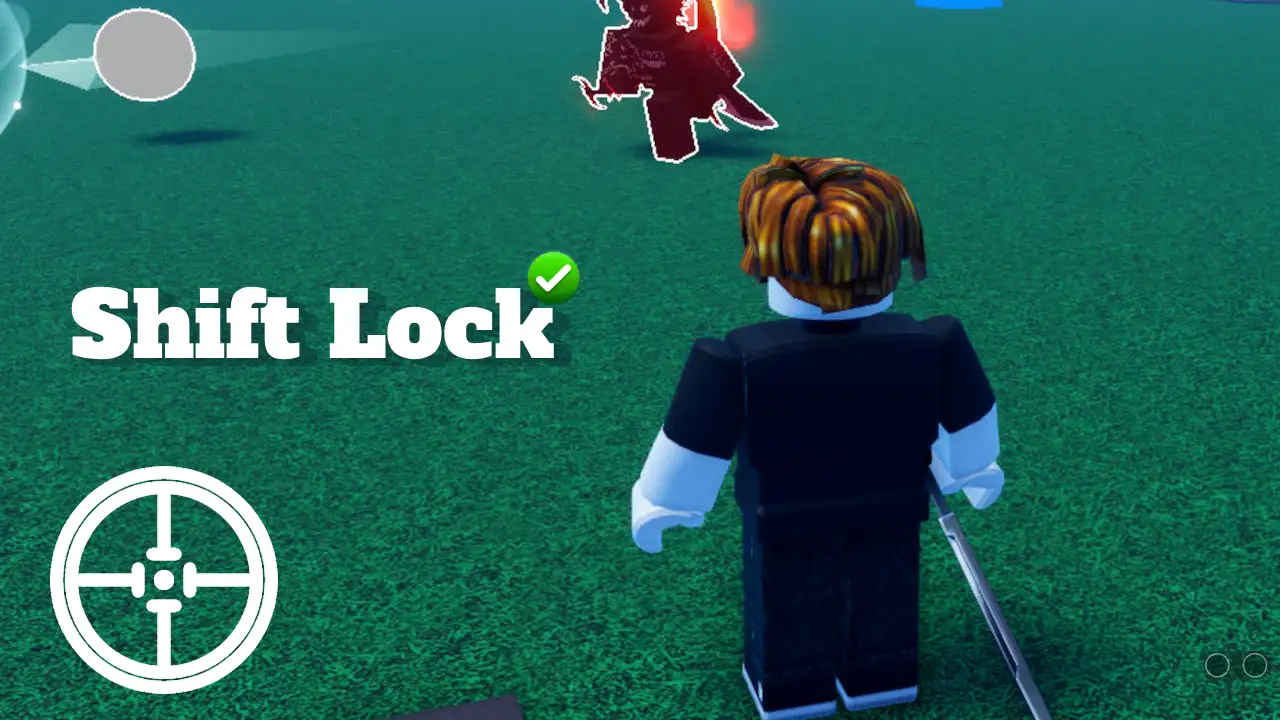
ROBLOX How To SHIFT Lock Desktop Mobile Roblox Den Image 6fe93f6911 . How To Shift Lock In Roblox FAST And EASY YouTube . How To Shift Lock In Roblox PC In SECONDS YouTube . Learn How To Shift Lock On Roblox 2022 Guide Blog Learn How To Shift Lock On Roblox 3. How To Get Or Enable Shift Lock On Roblox Mobile And PC 2026 Techy Get Enable Shift Lock Roblox Mobile Pc.webp


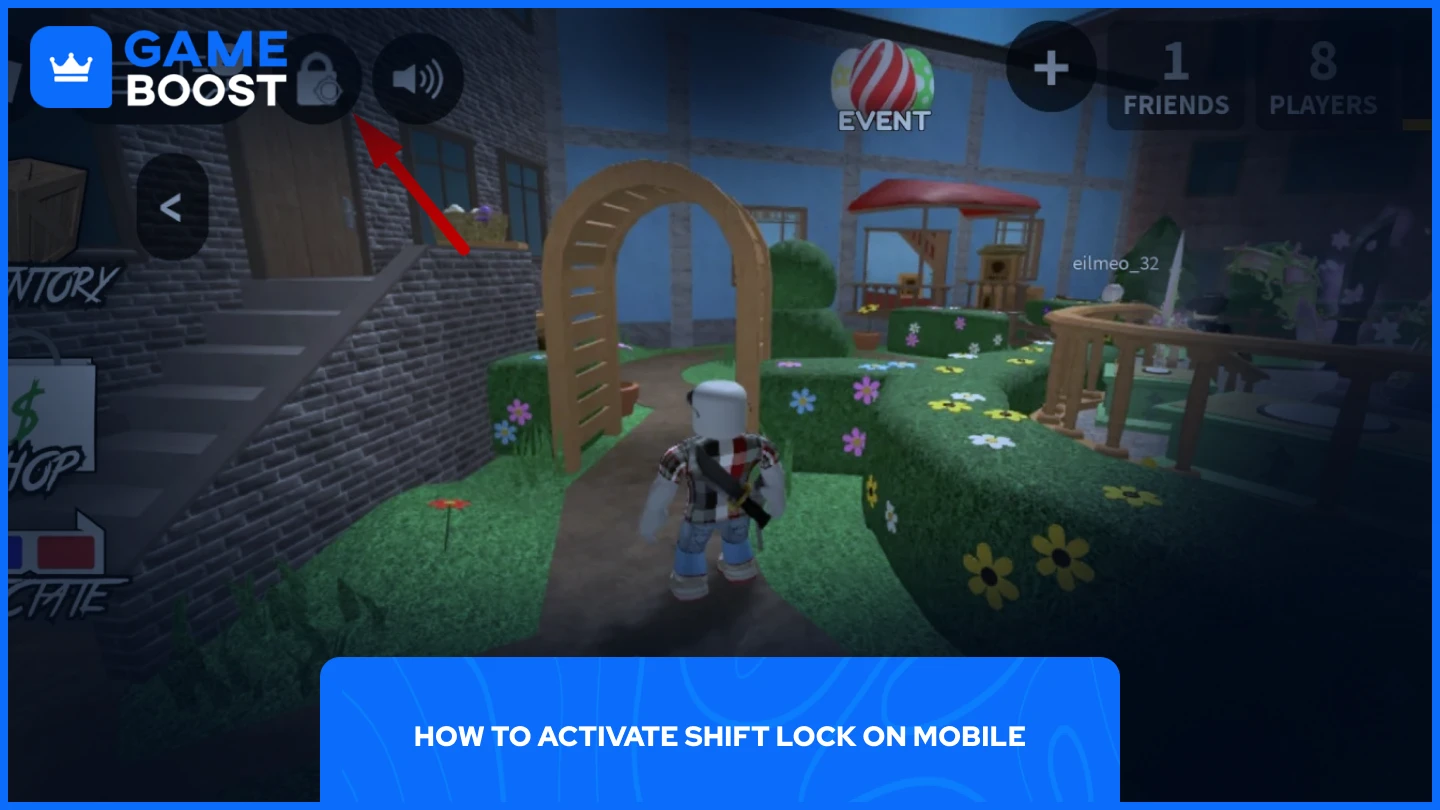
Custom Cursor On Roblox Shift Lock How To Change Your Roblox . How To Use Shift Lock In PC Roblox YouTube . How To Activate Shift Lock In Roblox 2026 Tutorial YouTube . How To Enable Shift Lock In Roblox Step By Step Guide 6dad346d B853 4217 A7ec. How To Enable Shift Lock In Roblox Step By Step Guide 1fd75767 7800 4c5d Ba4e


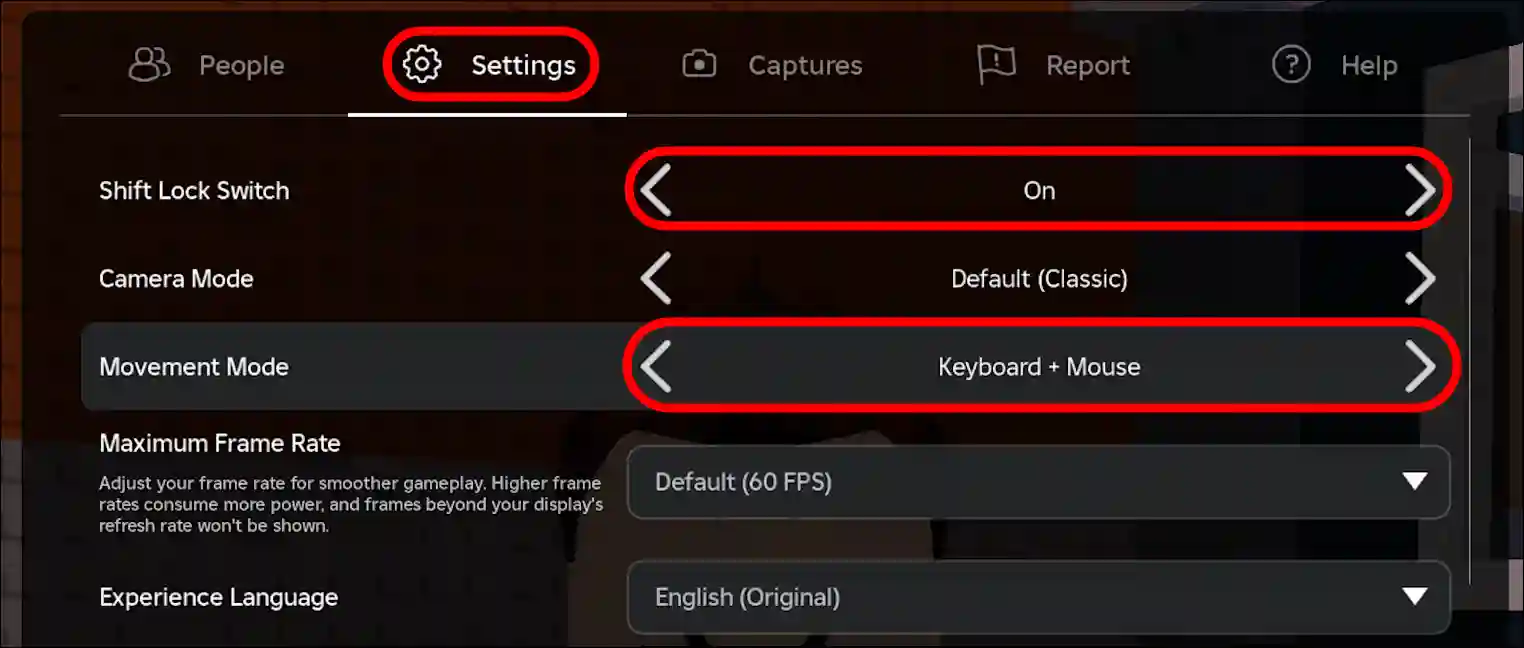

Roblox SHIFT LOCK PC Tutorial Turn ON OFF And Tips YouTube Hqdefault . How To Shift Lock In Roblox PC YouTube . How To Shift Lock On Roblox How To Fix If Not Working Alvaro Unnamed File 22 . How To Get Or Enable Shift Lock On Roblox Mobile And PC 2026 Techy Turn On Shift Lock On Roblox Pc.webp. How To Turn On SHIFT LOCK On Roblox Use Roblox Shift LOCK Tutorial



Roblox Forsaken How To Turn On Shift Lock Mode Tutorial Easy Guide . How To Get Or Enable Shift Lock On Roblox Mobile And PC 2026 Techy Get Shift Lock On Roblox Mobile.webp. How To Turn On Roblox S Shift Lock Setting Dexerto Doors Codes In Roblox . Learn How To Shift Lock On Roblox 2022 Guide Blog Learn How To Shift Lock On Roblox.webp. How To Enable Shift Lock In Roblox Step By Step Guide 27be1944 D154 4947 9deb Webp.webp


EASY TUTORIAL How To Get Shift Lock On Roblox YouTube . Everything You Need To Know About Shift Lock In Roblox V4 460px Shift Lock On Roblox Step 9 . How To FIX Cursor Moving With Shift Lock Problem Roblox 2025 Step . How To Enable Shift Lock On Roblox YouTube . How To Turn On Shift Lock In Roblox 17cf7 1920